
XIMEA Live Support
Live Support provides remote support by allowing XIMEA customers to share their desktop and system data with technicians at the XIMEA Helpdesk.
How it works
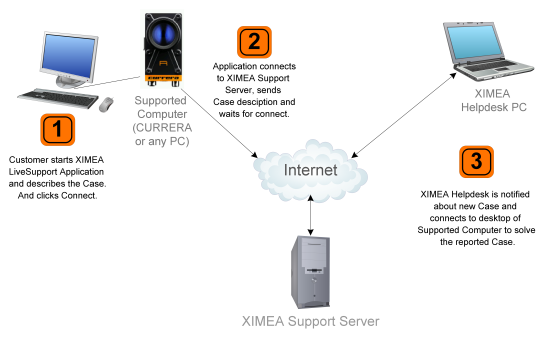
- Customer actions:
- Install bundled "Live Support" application on an Internet-enabled desktop or laptop customer computer
- Open XIMEA Live Support application on supported computer
- Enter customer's email address and "Case" description
- Click on "Connect" button
- Note: Customer can close the application anytime and terminate the connection with XIMEA Helpdesk Technicians.
- Helpdesk actions (8 a.m. to 8 p.m. CET):
- "Live Support" application notifies XIMEA Helpdesk Technicians immediately of the new customer Case
- Helpdesk Technicians solve the problem by viewing system data and remotely working with customer or customer representative
- After the case is successfully solved, Helpdesk Technicians email a completed action report to the customer for future reference
Simplified illustration of XIMEA Live Support architecture
»